Where most teams are today
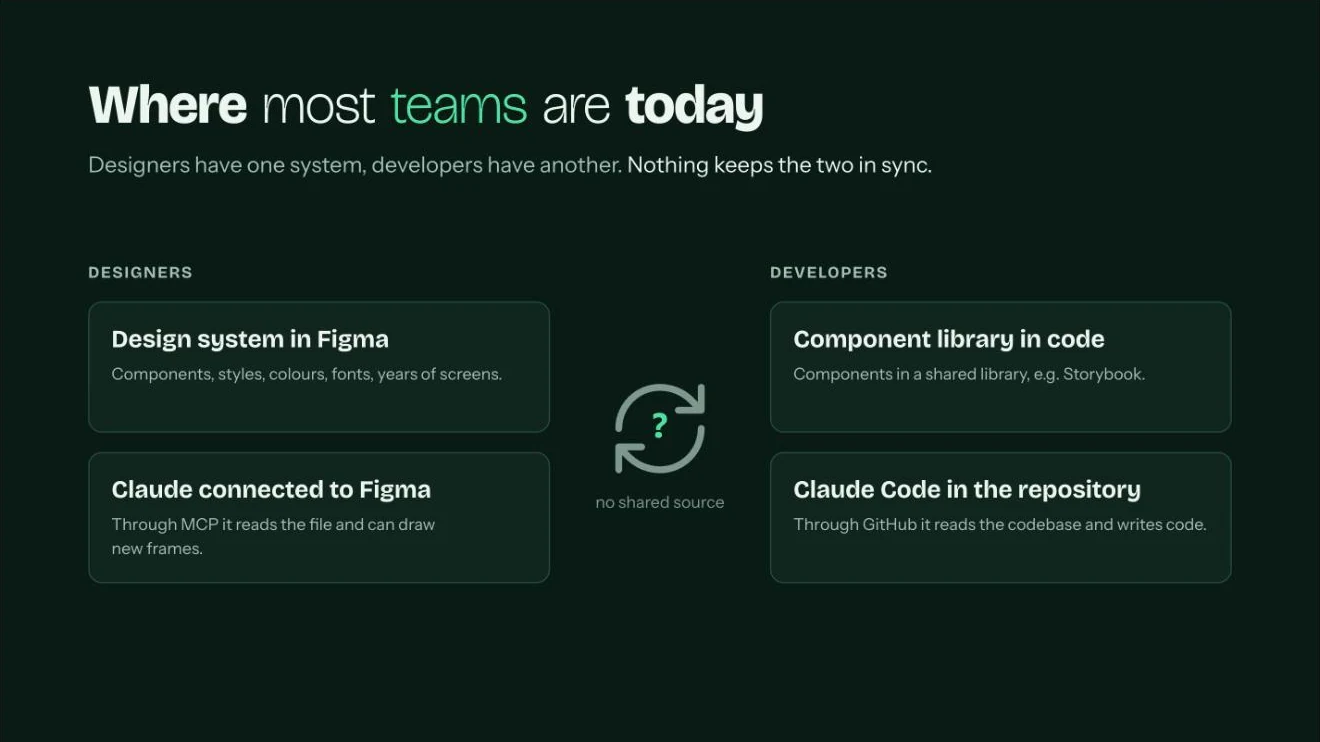
Designers have one system, developers have another, and nothing keeps the two in sync. The design system lives in Figma: components, styles, years of screens. The component library lives in code, often in Storybook. AI already sits on both sides: Claude reads and draws in Figma through MCP, and Claude Code reads and writes the codebase through GitHub. But there is no shared source, so every new screen is drawn once and built twice.
What I already do
AI is part of my daily work, not an experiment.
- 11 → 3.5 days from brief to clickable prototype on ASI Central, built in code and pushed to GitHub as a starting point for developers.
- 6 shared agents for the design team at Valor Software, with agents and skills documented in Notion.
- 31% → 64% completed driver registrations on Uride, where AI and OCR fill in document data inside the product.
- This site is built and run in code with Claude: 141 commits in the first 16 days of November, 115 of them co-written with Claude.
The goal: one system for people and agents
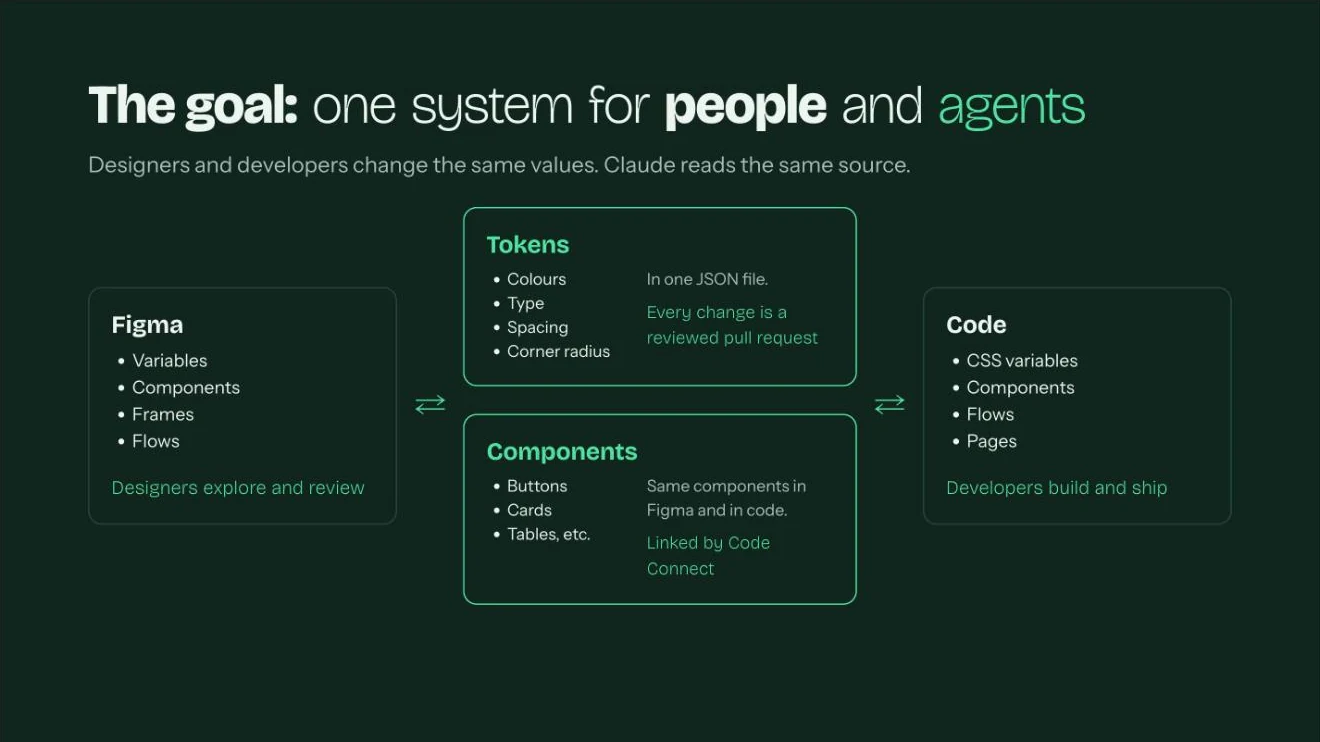
Figma and code connect through two things. Tokens: colours, type, spacing and corner radius in one JSON file, where every change is a reviewed pull request. Components: the same buttons, cards and tables in Figma and in code, linked by Code Connect. Designers and developers change the same values, and Claude reads the same source.
Six steps from Figma to code
- Audit what you already have · 1–2 daysClaude reads the library through the Figma MCP and writes a report: raw colour and spacing values, detached or edited instances, duplicate components, and a proposed token set based on what is really used. People decide what to fix and which tokens to keep.
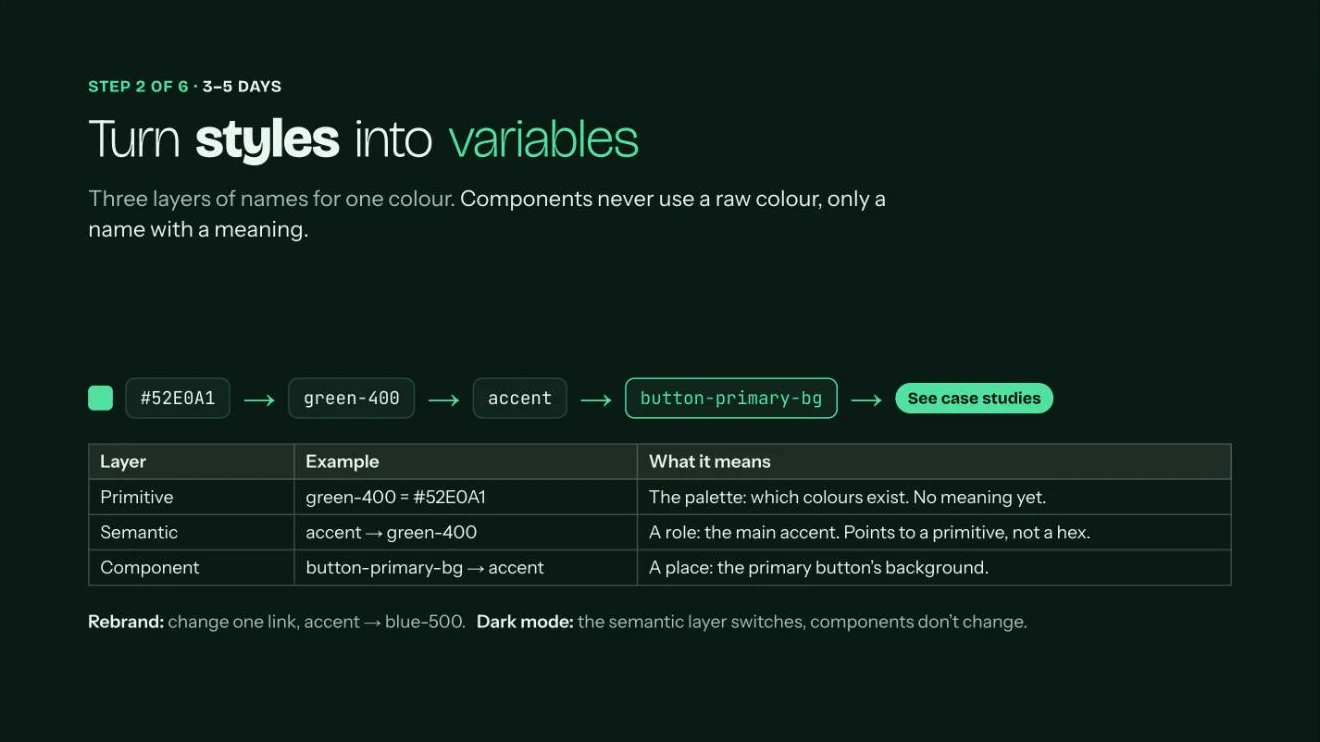
- Turn styles into variables · 3–5 daysThree layers of names for one colour: a primitive (green-400), a semantic role (accent) and a component place (button-primary-bg). Components never use a raw colour. A rebrand changes one link; dark mode switches the semantic layer, and components don’t change.
- Export one JSON file to the repository · 1–2 daysEvery change to the file is a pull request reviewed by the other side. A developer can propose a token change too, and a CODEOWNERS rule asks for both approvals.
- Developers generate code from the same file · 2–3 daysA build tool such as Style Dictionary turns the JSON into CSS variables, iOS and Android values on every merge. Change a value once, and Figma and the product move together.
- Connect Figma components to real code · 1 weekCode Connect tells Claude: don’t draw a new button, use ours. Start with 10–15 components: button, input, select, date picker, card, modal, table.
- Write the rules once · 2 days, then it growsA rules file in the repository: only components from the library, only tokens, every state designed, AA contrast, visible focus, the product’s own words. Plus shared skills for briefs, UX copy, design QA and spec notes. See an example rules doc for a button.
How work with developers changes
Handoff becomes a pull request. Instead of a Figma link and specs in a ticket, developers get a pull request with a preview link and real components already in place. The prototype is a starting point, not production code.
A designer builds two ideas with Claude, each on its own branch with its own preview link. The whole team comments on both live previews, picks one, a developer approves the pull request, and it becomes the new main.
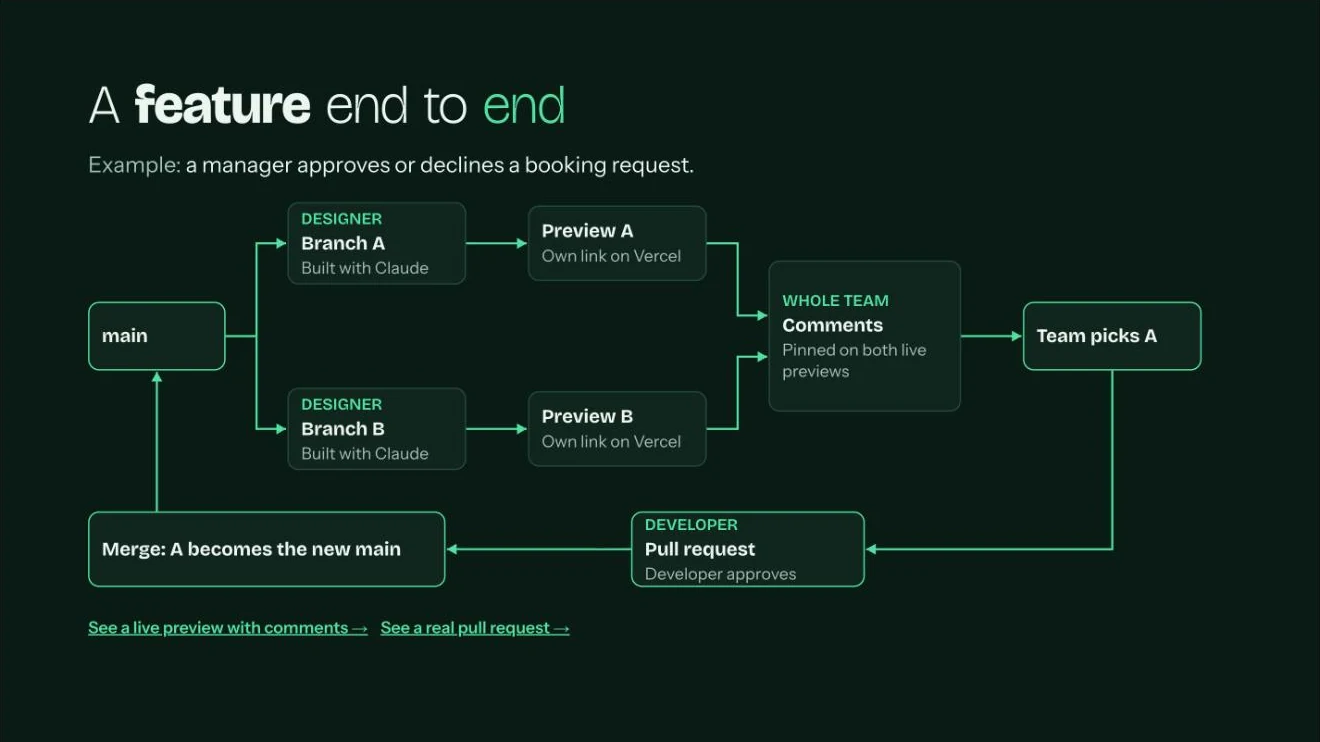
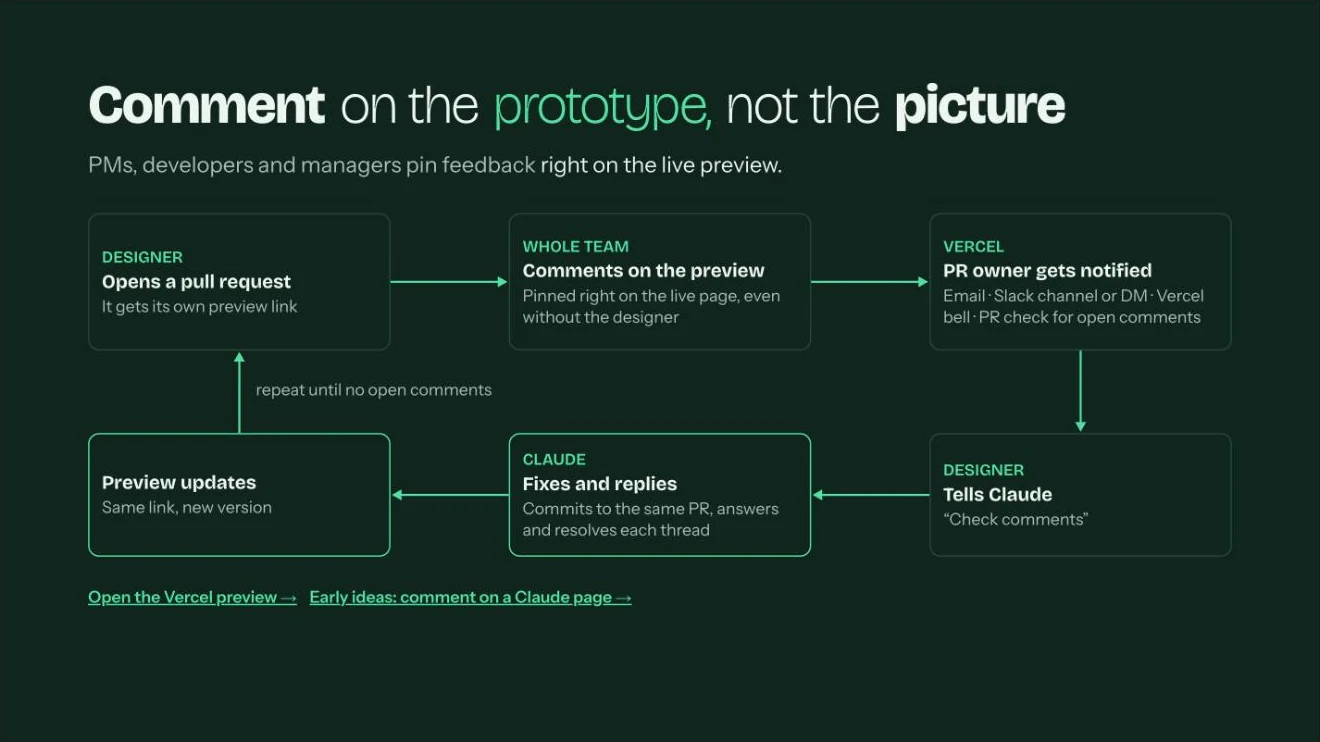
Feedback moves from screenshots to the live page. PMs, developers and managers pin comments right on the preview, even on a call without the designer. The PR owner gets notified, tells Claude to check the comments, and Claude commits the fixes to the same pull request, replies and resolves each thread. The preview updates on the same link until nothing is open.
Six weeks, one real feature
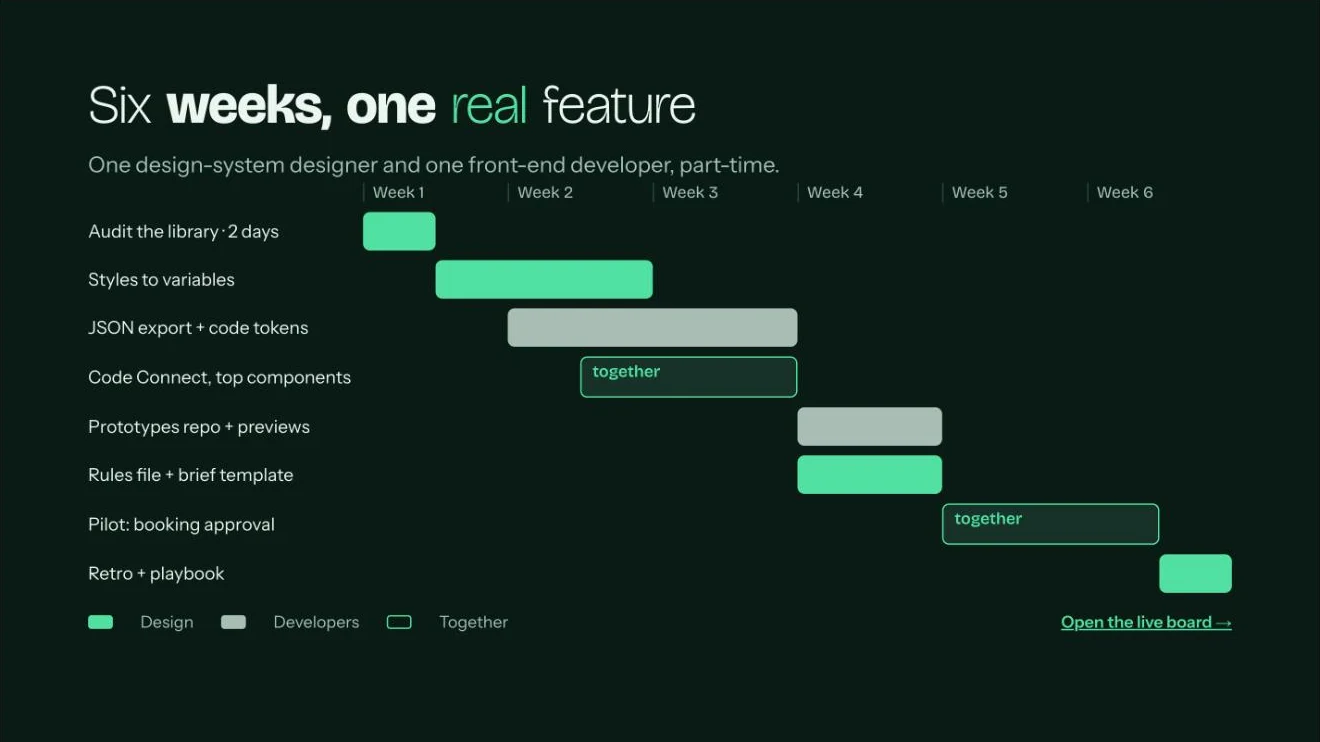
The plan I proposed needs no budget and no reorganisation: one design-system designer and one front-end developer, part-time. The audit and variables come first, then the JSON export and Code Connect for the top components, then a prototypes repository with previews and the rules file, and finally a pilot on one real feature, a retro and a playbook.
AI does the making. People decide.
AI draws variants and states, writes prototype code, checks contrast, tokens and states, and summarises research notes. People choose the direction, review and merge the code, judge the experience and talk to users. Speed comes from AI; quality and accountability stay with the team. The time AI saves goes into craft, product metrics and strategy.
What you can start tomorrow
- Run the audit promptOn your main library, through the Figma MCP you already have.
- Pick one componentThe button: variables, JSON, CSS and Code Connect, end to end.
- Choose the pilot featureSmall, real and visible, with one developer who is curious.
Start small: one component, one feature, measured.